
Create, maintain, and draft Jumpstart cubes
Build your cube around named themed packs, keep card assignments organized as the list evolves, then run a dedicated Jumpstart draft where players claim decks in a focused UI.
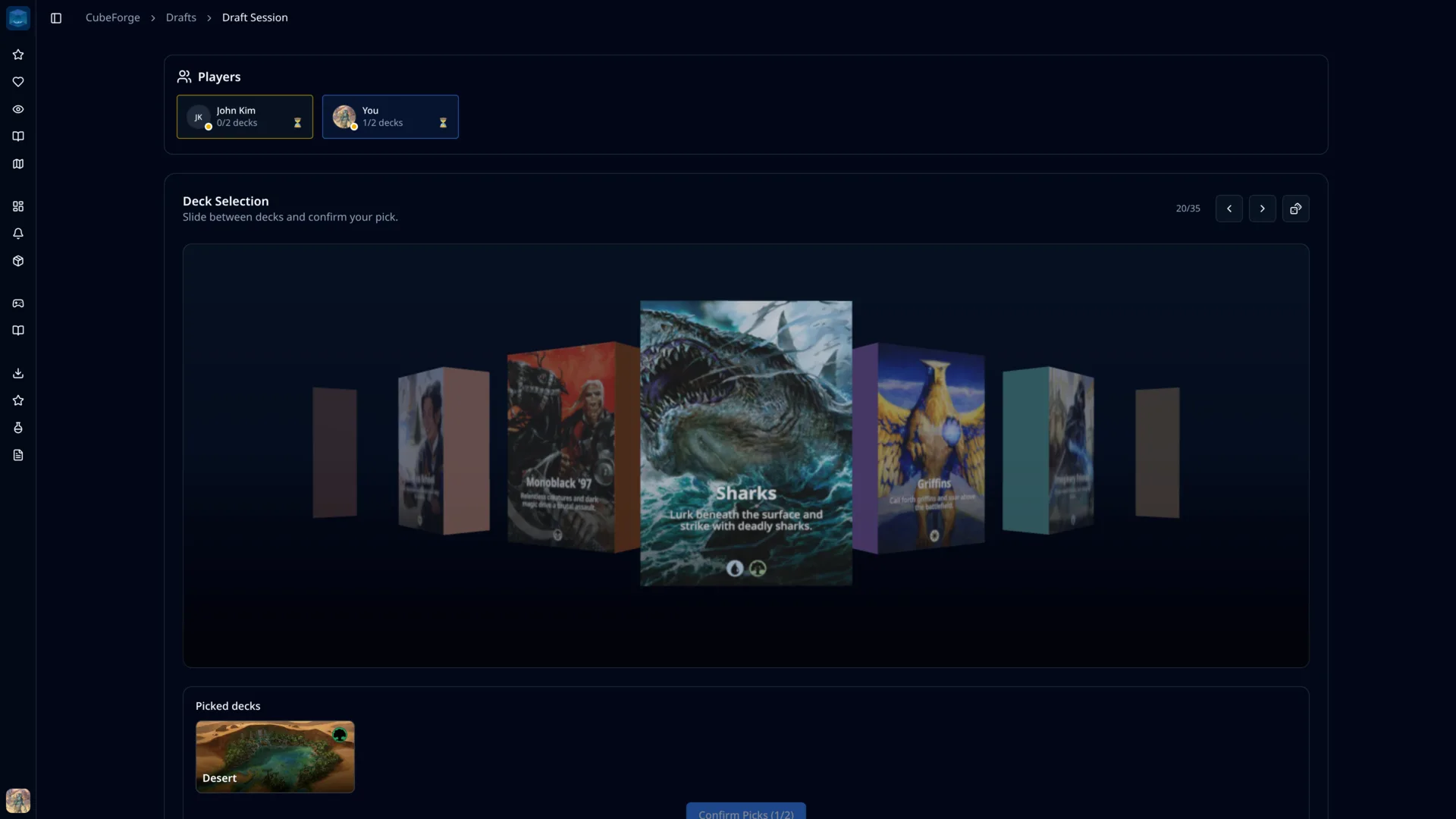
Maintain the cube as packs
Jumpstart cubes are more than card lists. CubeForge lets you model the cube as named packs so the structure remains visible while you edit.
Draft in a dedicated UI
When the cube is ready, players draft from the available Jumpstart decks instead of using a normal booster-pick interface.
Format basics
What is a Jumpstart Cube?
A Jumpstart cube is a reusable collection of themed mini-decks. Instead of drafting individual cards, players choose or receive complete packs, shuffle two together, and start playing.
That makes organization matter: each pack needs a name, a theme, and a maintained card list. CubeForge keeps those pack definitions connected to the cube and uses them directly when you launch a Jumpstart draft.
Build and maintain
Treat each Jumpstart pack as a real design object
CubeForge gives your Jumpstart decks a place in the cube editor. You can define the packs, assign cards to them, and keep the cube readable as you tune themes over time.
Named deck definitions
Create Jumpstart decks for themes, archetypes, color pairs, mechanics, or custom modules.
Card-level assignments
Assign cards to Jumpstart decks while adding cards, importing cards, editing details, or making bulk updates.
Readable long-term maintenance
Review the cube by pack, spot unassigned cards, and keep each theme understandable as the list changes.
Dedicated draft UI
Run the Jumpstart draft from the cube you maintained
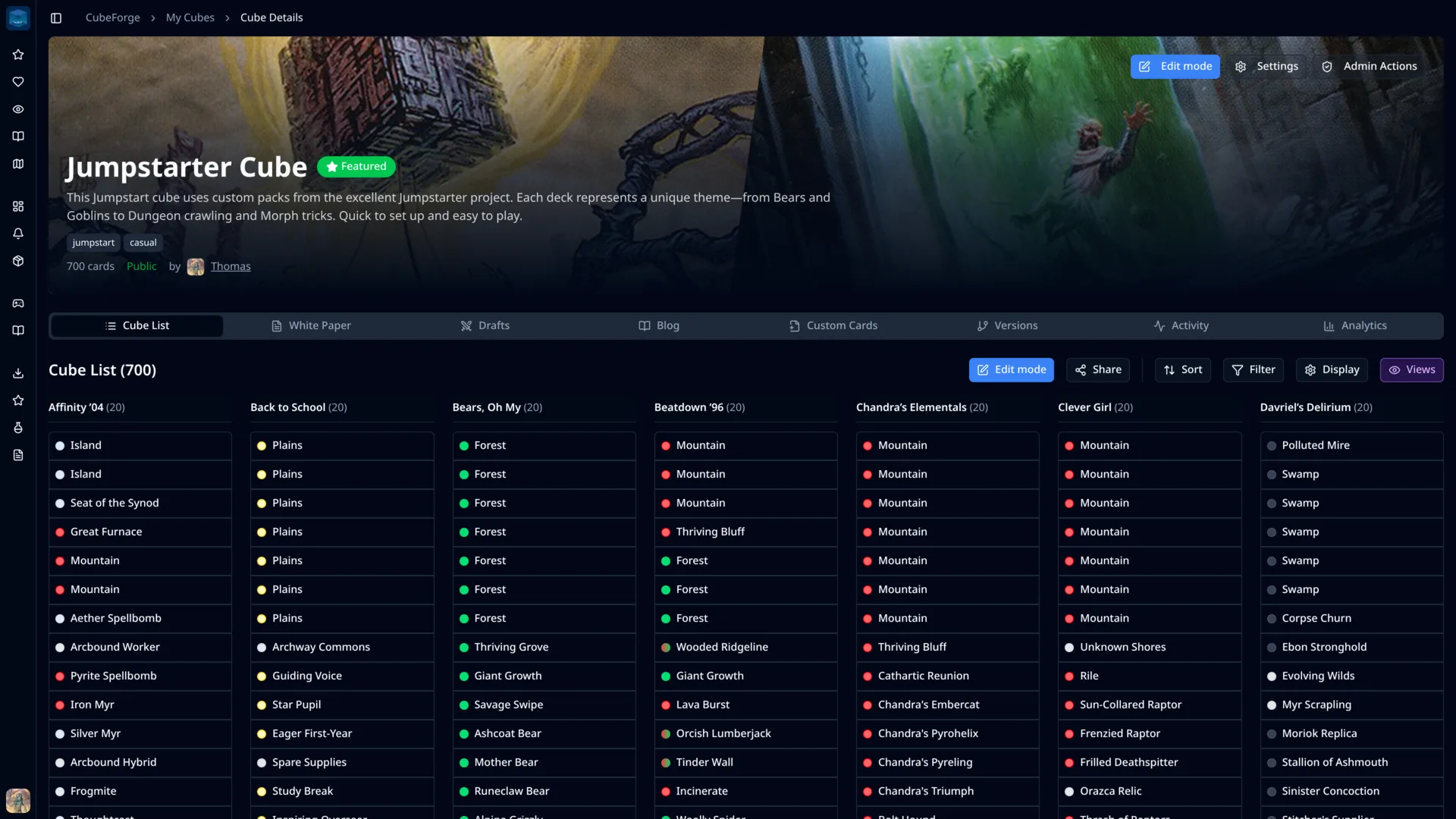
CubeForge does not force Jumpstart into a booster draft screen. Players join a Jumpstart session, see deck availability, choose their packs, and confirm picks from an interface built for that flow.
Jumpstart-specific session
The draft view centers on available decks instead of packs, pick orders, and passing.
Clear player progress
The table can see who is still choosing, who has locked picks, and which decks are already claimed.
Two decks become the pool
Each player claims the configured number of decks and moves forward with the combined card pool.
One workflow from cube design to draft night
The same structured data that helps you maintain the cube powers the draft experience when it is time to play.
Create the cube
Start with a normal CubeForge cube and define the Jumpstart decks it contains.
Maintain the packs
Assign cards to decks and keep the themes organized as you make changes.
Launch Jumpstart
Choose Jumpstart during draft setup when the cube has enough populated decks.
Pick and play
Players claim decks, combine their picks, and get to games with minimal setup.
What CubeForge handles for Jumpstart cubes
CubeForge keeps the format-specific details connected: organize the cube by packs, validate that the draft can run, then draft those packs in the right interface.
Build the cube, then draft it
Use CubeForge to keep your Jumpstart cube organized and run the draft from the same platform.
Jumpstart cube FAQ
Quick answers about building and drafting Jumpstart cubes on CubeForge.
What is a Jumpstart cube?
A Jumpstart cube is a collection of themed mini-decks, often 20 cards each. Players choose or receive two decks, shuffle them together, and play a 40-card deck.
Can CubeForge help maintain a Jumpstart cube?
Yes. CubeForge supports Jumpstart deck definitions and card assignments, so each themed pack can be managed as part of the cube rather than tracked separately.
Can I run a Jumpstart draft online?
Yes. If your cube has enough populated Jumpstart decks, CubeForge can create a dedicated Jumpstart draft session where players claim decks in real time.
What does a cube need before Jumpstart draft mode appears?
The cube needs defined Jumpstart decks and enough populated decks for the selected player count. CubeForge checks that requirement during draft setup.
© 2025 CubeForge. Made with ❤️ in Japan, for the MTG community.
Powered by Scryfall and their awesome database!
Magic: The Gathering, card images, mana symbols, and all related intellectual property are owned by Wizards of the Coast LLC. CubeForge is not affiliated with, endorsed, sponsored, or specifically approved by Wizards of the Coast LLC.