
June 5, 2026
Version 0.6.13 - Release Notes
CubeForge 0.6.13 adds the new cube slug system, polishes the cube view interface, and makes saved views easier to understand and manage.
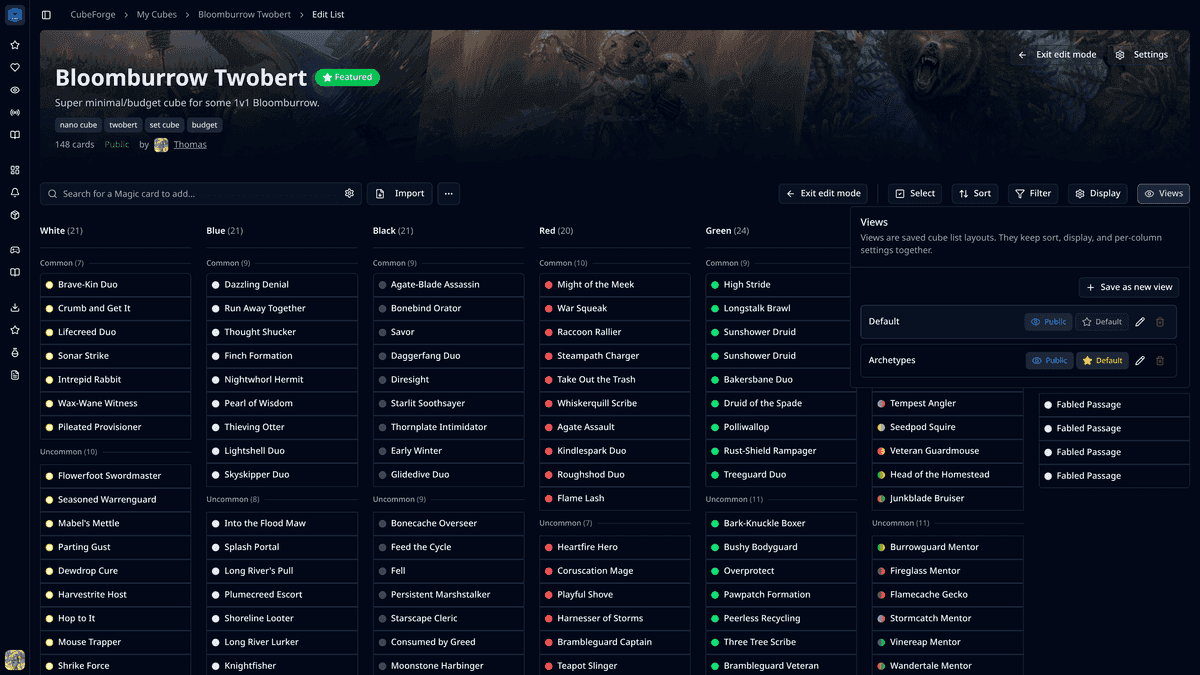
Version 0.6.13 focuses on making cube pages easier to share, easier to read, and easier to customize.
The biggest addition is the new slug system for cubes. I also spent time cleaning up the cube view interface and reworking the saved views popover, which is one of the more powerful parts of CubeForge but had become harder to understand than it should be.
🔗 Cubes now have readable URL slugs
CubeForge now supports readable URL slugs for cubes.
Newly created cubes can automatically get a slug based on their name, so a cube can use a cleaner URL like /cubes/onslaught-twobert instead of relying only on a generated document id.
Cube owners and editor collaborators can also update the slug from the cube settings page. CubeForge checks that the slug is valid, not reserved, and not already used by another cube.
This should make cube links nicer to share, easier to recognize, and more stable for public-facing cube pages.
🧭 Cube view controls are clearer and more consistent
I reworked several details around the main cube view so the interface feels more predictable.
The buttons for entering and leaving edit mode now use clearer labels and consistent icon treatment. The edit controls are also placed more deliberately in both readonly and edit mode, so it should be easier to tell what state you are in and how to switch back.
The cube list loading state also got a cleanup. Instead of a simple spinner, CubeForge now shows a lightweight skeleton that better matches the real list layout while the cube list is loading.
👁️ Saved views should be much easier to understand
Saved views are one of CubeForge's strongest features: they let you keep different ways of looking at the same cube, with different sorting and display settings.
Before this release, the views popover was doing the job technically, but it was not especially easy to read. Important actions were hidden behind controls that felt a bit too abstract, and it was not obvious enough which view was active, public, or set as the default.
In 0.6.13, the views popover has been redesigned around a simpler card list. Each saved view is shown directly, the active view is easier to spot, and visibility/default settings now behave more like compact toggles.
Newly created views are also public by default, which should make shared cube pages behave more naturally when you save a useful layout.
🧱 Edit mode visual polish
Edit mode now applies a darker overlay to cube cover images, including the default no-cover state.
This is a small visual change, but it helps separate the editing workspace from the public-facing cube page while keeping the cube information visible.
If you notice anything off, please open a ticket here: Report a bug. You can also ask me directly in the CubeForge Discord.