
June 12, 2026
Version 0.7.4 - Release Notes
CubeForge 0.7.4 adds Oracle Tags from the Scryfall Tagger project, a customizable analytics page, and better mana base and removal insights.
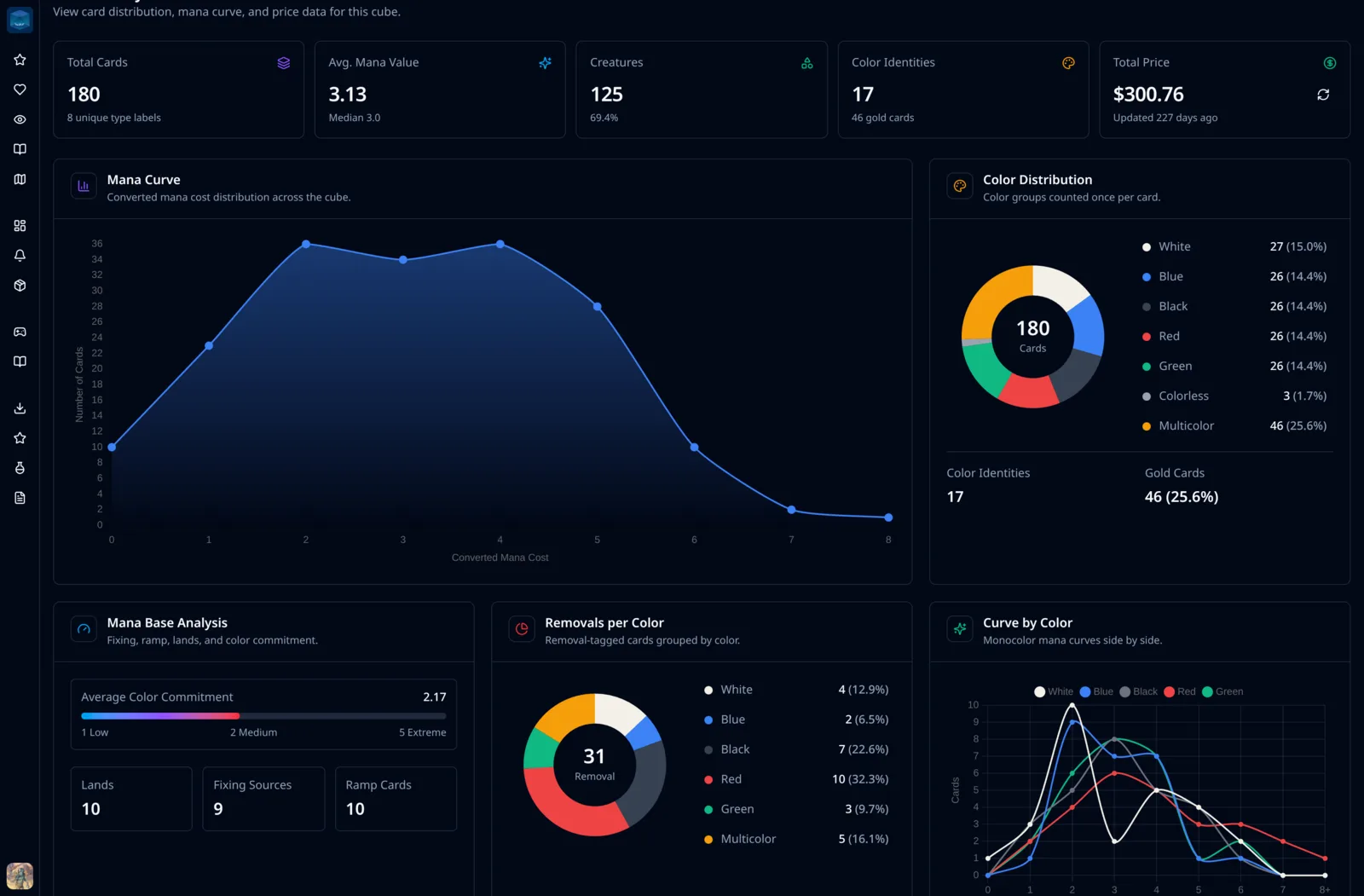
Version 0.7.4 brings Oracle Tags into CubeForge and gives the analytics page a much stronger foundation.
Cube analytics are only useful when the app understands what cards actually do. Color, mana value, and card type are helpful, but they do not tell the full story. A mana rock, a removal spell, a reanimation target, and a payoff creature can all look similar from raw card fields alone.
This release starts using tags from the Scryfall Tagger project so CubeForge can reason about cards in a more gameplay-aware way.
🏷️ Oracle Tags are now stored on cube cards
CubeForge can now save Oracle Tags for cards in your cube.
These are compact tag labels from the Scryfall Tagger project. They describe gameplay roles such as removal, ramp, fixing, burn, reanimation, and many other card functions.
You can retrieve tags from the Advanced tab in cube settings.
📊 The analytics page has been redesigned
The cube analytics page has been reworked around clearer cards, denser summaries, and more readable charts.
The page now surfaces the most important information faster:
- Total cards, average mana value, creature count, color identities, and price summary at the top
- A larger mana curve chart
- Donut charts for color distribution and card types
- Curve-by-color and curve heatmap views
- A cleaner highest-price cards section
The goal is to make analytics feel less like a pile of charts and more like a dashboard you can scan while making cube decisions.
🌈 Mana base analysis now uses Oracle Tags
The mana base analysis now uses Oracle Tags to count fixing and ramp cards.
Previously, CubeForge had to infer those roles from card text. That worked for some obvious cases, but it was always limited. Text-based checks can miss cards with unusual wording, count cards that technically mention mana but do not play as ramp, or fail to understand role-specific cards cleanly.
Using Oracle Tags gives CubeForge a better signal for questions like:
- How much fixing does this cube actually have?
- How many ramp cards are available?
- Is the mana base support keeping up with the cube's color demands?
This should make the mana base panel more useful for both regular cubes and more specialized environments.
⚔️ New removals per color chart
There is also a new Removals per Color chart.
This chart uses Oracle Tags to find removal cards, then groups them by color. It gives a quick view of where interaction is concentrated in the cube.
That can help answer questions like:
- Is one color carrying too much of the removal?
- Are some colors under-supported?
- Does the removal spread match the gameplay you want?
This is the kind of chart that becomes much more reliable once CubeForge can use gameplay tags instead of trying to guess from card text alone.
🔎 Tag coverage checks
Tag-based analytics only show up when enough of the cube has Oracle Tags saved.
If fewer than 20% of cards have tags, CubeForge will show an Oracle Tags prompt inside tag-based analytics blocks and point you to the Advanced settings tab first. That avoids showing misleading analytics when most of the cube has not been tagged yet.
Once tags are retrieved, the analytics page can use them immediately.
🧩 Analytics pages are now customizable
Cube owners can now customize the analytics page directly.
The new edit mode lets you add, remove, reorder, and resize preset analytics blocks in a three-column grid. Blocks can be one column, two columns, or full width, so the page can fit the way you actually inspect your cube.
Some blocks can also expose simple settings. For example, the Summary Metrics block lets you choose which metrics to show, so you can keep the top of the dashboard focused on the numbers that matter most to your cube.
This is only the beginning for customizable analytics. More blocks and more block settings are planned, with the goal of giving each cube much more granular analytics that can adapt to its specific structure, themes, and gameplay goals.
As always, if you notice anything off, please create a bug report here: Report a bug. You can also ask me directly in the CubeForge Discord.