
June 18, 2026
Version 0.7.7 - Release Notes
CubeForge 0.7.7 gives completed drafts a proper recap page, making it easier to review your pool, build your deck, share the result, and see the whole pod.
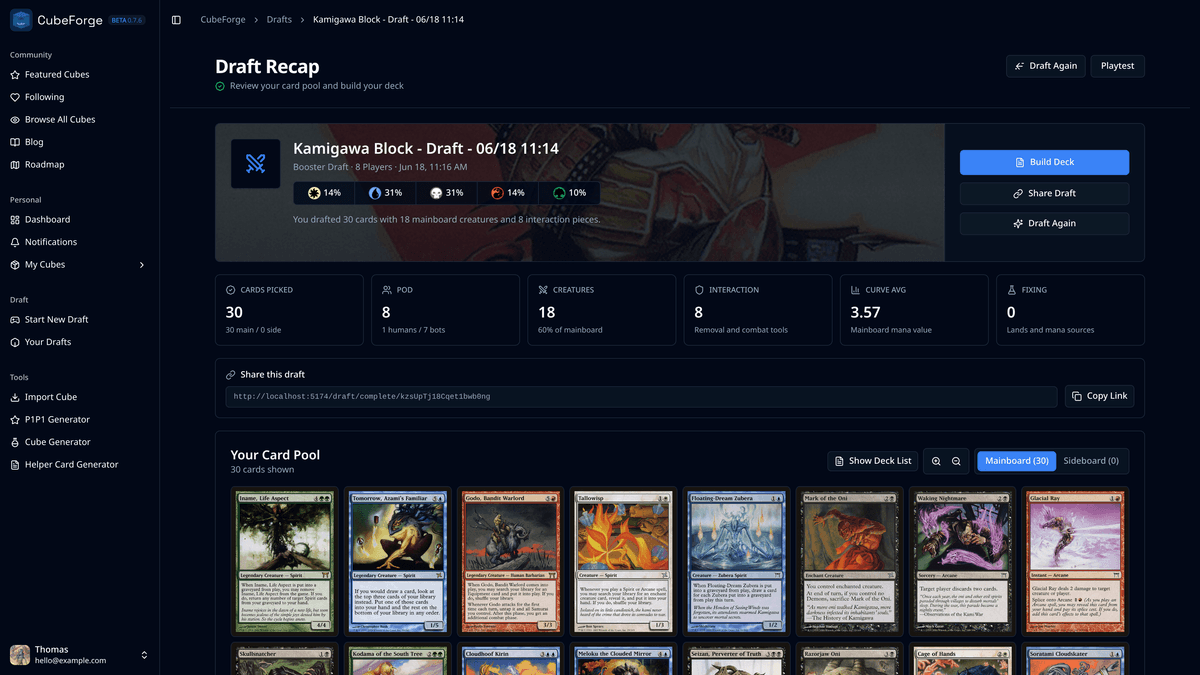
Version 0.7.7 focuses on what happens after the last pick.
The draft experience in CubeForge has become much stronger over time, but the old draft complete page did not really match that feeling. After spending time making picks, reading signals, and ending up with a pool, the result was shown as a plain stack of decklists.
That worked, but it did not feel like a proper end to the draft.
This update gives completed drafts a real recap page.
🏁 A better ending to every draft
The new draft recap is designed to make the end of a draft feel more useful and more rewarding.
At the top, you now get a clear summary of the draft: the cube, draft type, pod size, color spread, card count, creature count, and interaction count. It gives you a quick read on what you drafted before you start making deckbuilding decisions.
The page also uses the cube cover more prominently, so the recap feels tied to the cube you just drafted instead of looking like a generic export screen.
🃏 A smoother path into deckbuilding
Your card pool now has more room to act like a deckbuilding space.
You can switch between mainboard and sideboard, zoom the card grid, right-click cards for quick actions, and move cards between zones more comfortably. The goal is to make the first pass at your deck feel natural instead of making you jump straight into a text export.
Decklists are still available when you need them, including a Moxfield-style text view, but the first experience is now visual.
🤝 Easier sharing and pod review
The recap page now includes a compact share link, a pod overview, and cleaner decklist previews.
When decklists are public for the draft, you can inspect other players' pools from the pod overview. When they are private, the page still shows who was in the pod without exposing their cards.
This should make finished drafts easier to talk about, compare, and revisit.
The goal of this release is simple: finishing a draft should feel like a moment, not a dead end.
As always, if you notice anything off, please create a bug report here: Report a bug. You can also ask me directly in the CubeForge Discord.