
August 31, 2026
Version 0.8.12 - Release Notes
CubeForge 0.8.12 turns Activity into a compact cube history, refreshes White Papers as Cube Primers, and makes card images more reliable.
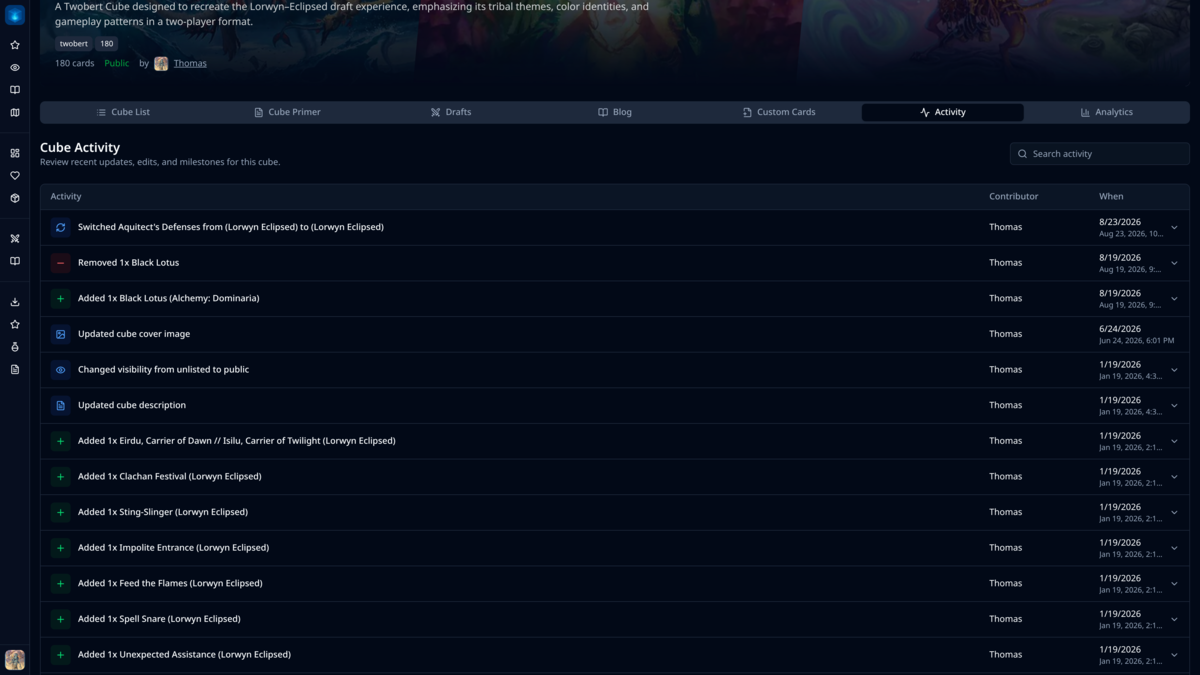
Version 0.8.12 makes it easier to understand how a cube has changed, gives its design document a friendlier identity, and smooths out card images across editing and drafting.
🕒 Activity that works as a cube history
The Activity tab now uses a compact table instead of a long stack of entries. Each change keeps its description, contributor, and date easy to scan, while search sits beside the page heading and longer histories are split into manageable pages.
Click anywhere on an activity row to see its details. The expanded information stays on one line, so even changes with several fields do not make the page unnecessarily tall.
Printing changes are clearer as well. When a card is switched to another version, the old and new set code, collector number, and finish are shown together—particularly useful when both printings come from the same set.
📖 White Papers are now Cube Primers
White Paper always felt a little too formal for a document about a cube, so it is now called Cube Primer throughout CubeForge.
New Cube Primers begin with the full cube-design outline already loaded. Philosophy, design goals, archetypes, power level, and notable card choices are ready to adapt immediately, without facing an empty editor or choosing a template first.
Cube Primers no longer need a separate title; the document itself can begin with the heading that makes sense for the cube. Existing content remains intact, while old titles simply stop appearing. The new name and surrounding copy have also been updated in French and Japanese.
🃏 Smoother card images
Card images now appear more reliably while drafting. Packs use a quiet card-shaped placeholder while an image is loading, avoiding blank spaces or sudden flashes between picks.
Hover previews in the cube editor also react more smoothly as you move through a list, with less visual churn between cards.
✨ Smaller fixes and polish
The custom-card editor now makes better use of the available screen width, giving the image area and card fields more room. The unused Import button has also been removed.
Colour sorting and analytics now handle custom cards more consistently. The cube header is a little quieter too: Create P1P1 now lives in the cube's Drafts tab, where it is easier to find alongside the other ways to play.
If you find a bug or a card that looks wrong, please report it here or let me know in the CubeForge Discord.