
September 1, 2026
Version 0.8.13 - Release Notes
CubeForge 0.8.13 makes Analytics explorable, saves guest drafts to account history, and refreshes collaboration with email-based access.
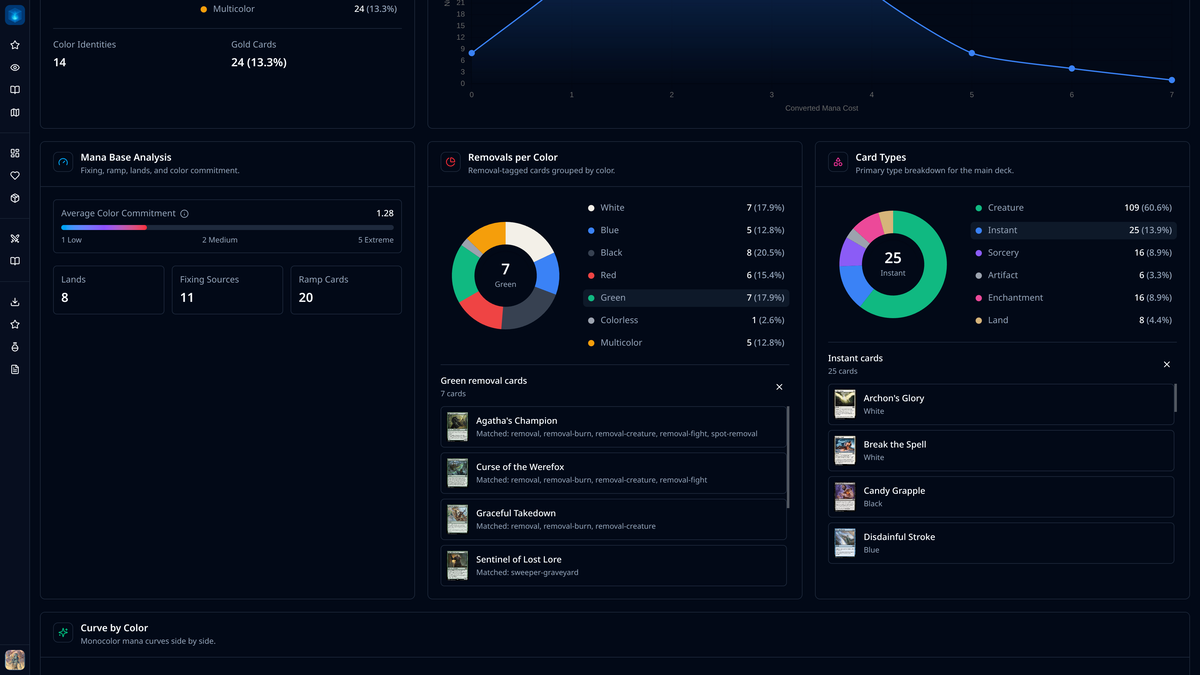
Version 0.8.13 makes cube data easier to inspect, gives guest drafts a path into your history, and makes collaboration clearer and safer.
📊 Analytics you can inspect
Analytics charts no longer stop at the totals. Click a slice or legend entry in Color Distribution, Removals per Color, or Card Types to reveal the cards behind that segment. The card lists stay compact and scrollable, and removal results show the Oracle tag that caused each card to match.
The Removals per Color settings now expose the Oracle tag matchers used by the block. Keep the existing defaults, remove a matcher that does not suit your environment, or add tags that better describe your cube.
The default Analytics layout has also been adjusted to put Card Types before a full-width Curve by Color. A new tooltip explains Average Color Commitment and what a higher score means for a cube's mana requirements.
🤝 Clearer collaboration by email
CubeForge usernames are not unique, so collaborators are now added using the email address attached to their CubeForge account. This makes it much clearer that the right person is receiving access.
The collaborators screen has been tightened up with an inline add action and clearer current-collaborator rows. Collaborators can update the card list and most cube settings, while deleting the cube and managing access remain owner-only actions.
💾 Keep a guest draft in your history
Completed guest drafts now include a Save in your draft history action. If you do not have an account yet, CubeForge takes you through sign-up, then saves the completed result and opens its recap once your account is ready.
The draft then appears alongside your other results in Your Drafts, so a guest session does not have to disappear when you close the page.
✨ Smaller fixes and polish
The desktop sidebar now expands and collapses immediately. Popovers also stay within the available screen space and scroll when necessary, instead of extending beyond the edge of the viewport.
When a cube uses Advanced Bots, its bot information is now available from card details in read-only views. The update prompt also names the version waiting to be loaded, making it clearer what will change after a refresh.
If you find a bug or a card that looks wrong, please report it here or let me know in the CubeForge Discord.