
August 20, 2026
Version 0.8.7 - Release Notes
CubeForge 0.8.7 lets you draft with English, French, or Japanese card printings, regardless of the cube's original language.
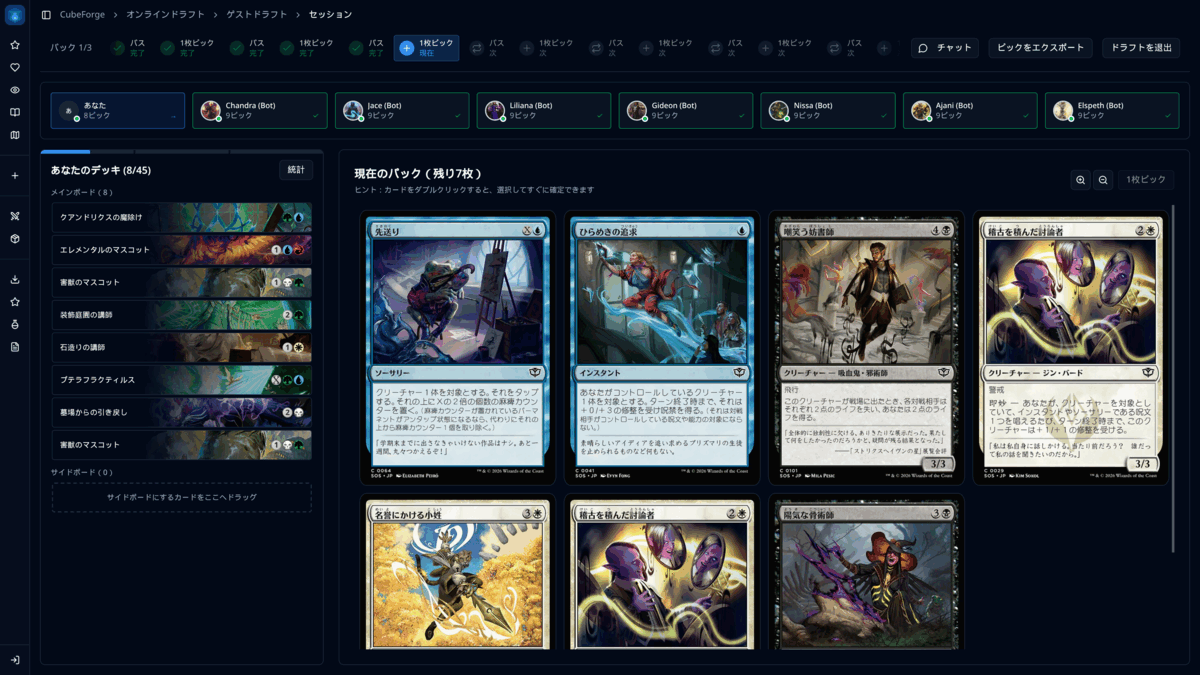
A cube's card language no longer has to be every drafter's card language.
Version 0.8.7 lets you choose English, French, or Japanese card printings before starting a draft. An English cube can be drafted in Japanese, a Japanese cube can be drafted in French, and Default keeps the cube's original cards exactly as they are.
🌍 Draft with your preferred card language
The new Preferred card language setting is available in Draft Settings for both online and guest drafts.
Choose English, French, or Japanese, and CubeForge finds real printings in that language, with printed card names, text, and images from Scryfall. CubeForge is not generating or machine-translating card content.
Your choice only affects that draft. It does not edit the cube or change the printings selected by its owner.
🈶 Better localized card names
Localized double-faced cards now show both printed face names throughout cube lists, even when the card data does not provide a combined localized name at the top level.
Cube-list search also recognizes those printed names. For example, a Japanese card can be found by its Japanese name while still matching the same underlying Oracle card.
🖼️ Sharper card hover previews
Card hover previews should now stay noticeably sharper across CubeForge. Their position is no longer applied through a moving transform, which could make a high-resolution image look softer than a larger card rendered directly on the page. Preview coordinates are snapped to physical pixels instead, and the tooltip now sits a little closer to the pointer.
The progressive image loading remains in place: a small image appears first, then a higher-resolution version replaces it once ready. Larger draft previews now upgrade to a higher-resolution Scryfall image when available.
Selecting a public or set cube during draft setup is smoother too: the selection appears immediately without making the whole page flash through its loading state.
A note on localized card scans: Some localized card images are only available in lower resolutions. CubeForge uses the scans available through Scryfall, so it cannot make those source images sharper. If you would like to help improve them, you can contribute scans by following Scryfall's scanning guidelines.
If you find a bug or a card that looks wrong, please report it here or let me know in the CubeForge Discord.