
March 24, 2026 · Updated March 24, 2026
Set Cube Generator: How to Create a Set Cube in CubeForge
Looking for a set cube generator? Use CubeForge to build a set cube from any Magic set, adjust copies by rarity, and export a draft-ready list in minutes.
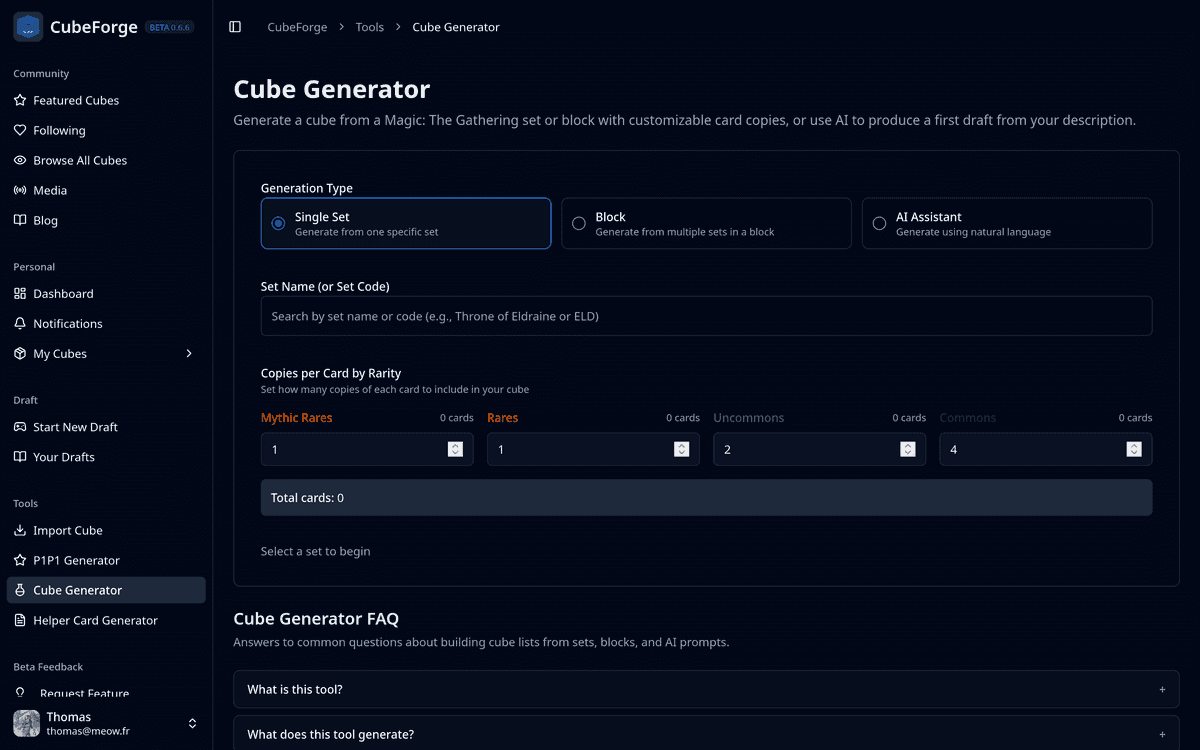
If you are looking for a set cube generator, CubeForge gives you a very fast way to build one from any Magic: The Gathering set.
The idea is simple: choose a set, decide how many copies of each rarity you want, and let the tool generate a full list for you. From there, you can export it as a text list to use in a different app.
How to create a set cube
- Open the Cube Generator.
- Leave the generator in Single Set mode.
- Search for the set you want by name or set code.
- Set your copies per card by rarity for mythics, rares, uncommons, and commons.
- Review the live total cards count.
- Copy the generated list or click Create Cube From This List.
That is the whole workflow. In practice, the only real decision is how you want your rarity mix to feel.
Copy count starting point
A simple starting ratio is the CubeForge default:
- 1 copy of each mythic
- 1 copy of each rare
- 2 copies of each uncommon
- 4 copies of each common
That gives you a solid draftable foundation right away. From there, you can tweak the numbers to push the cube toward a more powered or less powered environment.
CubeForge updates the total card count as you change those values, which makes it easy to aim for a target size like 180, 360, or 540 cards.
Why this is useful
Building a set cube by hand can be slow, especially if you are copying every card one by one and trying to track rarity distribution yourself.
Using a set cube generator speeds that up a lot:
- you can start from any set quickly
- you can tune the rarity mix in seconds
- you can export a clean list for further editing
Final tip
The generated list is draftable as-is, so you can start playing immediately.
That said, it works best as a base. After a few drafts, refine the list so it better reflects what you personally like about the set, and remove cards that do not fit that vision or feel too strong for the environment.
If you want a quick starting point for a new set cube, try the CubeForge Cube Generator.