
July 21, 2026
Version 0.7.11 - Release Notes
CubeForge 0.7.11 makes large cubes easier to maintain, with faster card entry, cleaner multi-card selection, and a refreshed home for draft results.
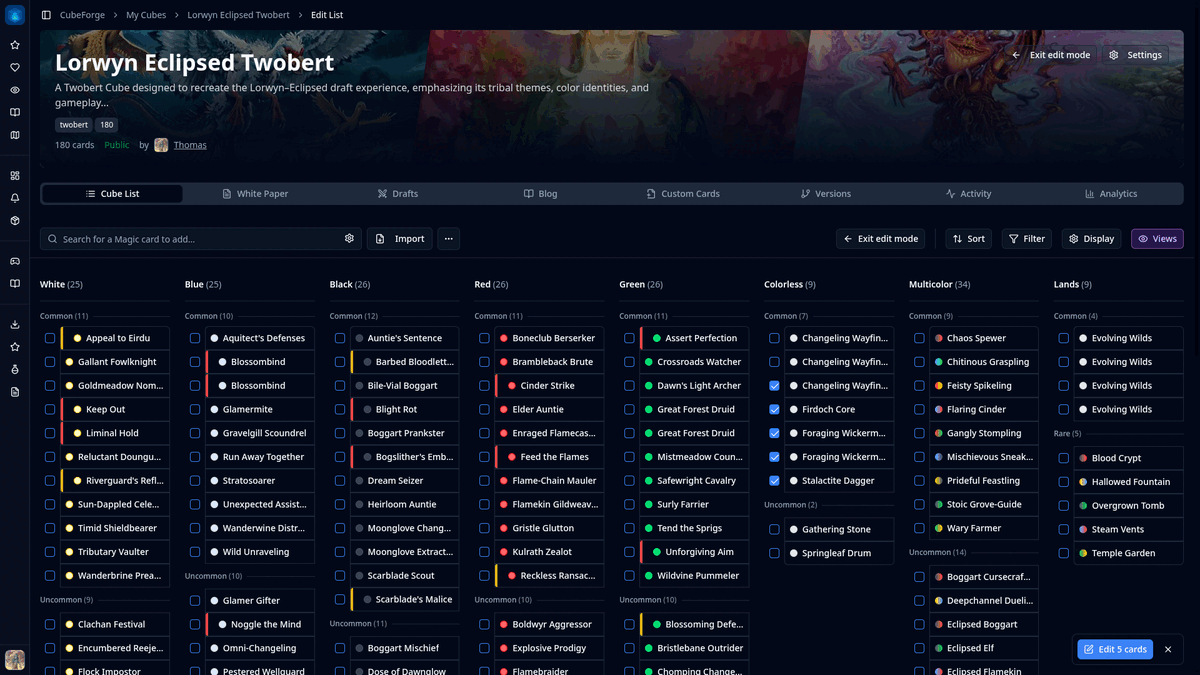
Version 0.7.11 focuses on the everyday work of maintaining a cube.
Adding one card is easy. Working through a long list, making dozens of changes, and keeping your place is where small interruptions start to add up. This release smooths out that workflow so the editor feels quicker and stays out of your way.
It also gives completed drafts a clearer home and adds a little more polish to the public side of CubeForge.
Add several cards without breaking your flow
The card search now stays focused after you add a card to your cube.
That means you can search, add a card, and immediately start typing the next name without clicking back into the field each time. It is a small change, but it makes a noticeable difference when you are importing ideas from a decklist, building a new section, or making a larger batch of swaps.
Your chosen destination and card search settings continue to work as before, so adding cards to the main cube or Considering list remains part of the same quick workflow.
A cleaner way to select cards
The permanent Select button has been removed from the editor toolbar.
Instead, moving to the left side of a card reveals a checkbox beside it. Selecting the first card opens selection mode and shows the remaining checkboxes, without covering the card's color indicator.
You can use Shift-click to select a range, including groups with multiple copies. When you are finished, clicking away or clearing the final card closes selection mode automatically.
Selection actions now appear in a compact floating control at the bottom-right of the screen. It tells you exactly what will happen with labels such as Edit 5 cards, while keeping the main editor toolbar free for sorting, filters, display settings, and views.
This should make bulk editing feel much more natural, especially in larger cubes where the cards you want to change may be spread across a long list.
A better home for completed drafts
The Drafts tab on cube pages has been refreshed.
It now gives you a clearer overview of recent draft activity, including how many results are available, how many are public, and when the latest draft was completed.
Individual draft results are easier to scan too. Each entry shows its visibility, format, completion date, and number of players, with a direct path back to the full recap. Starting another draft from the same cube is also more prominent.
The goal is to make a cube's draft history feel like part of the cube itself, rather than a simple list of old sessions.
Smaller public-facing improvements
Public profiles now show when a member joined CubeForge.
Cube search results, guides, blog posts, and other shared pages have also received some general polish so they are more consistent to open, browse, and share. The Jumpstart cube pages have clearer explanations for players discovering the format for the first time.
Version 0.7.11 is mostly about reducing friction. Adding cards should take fewer clicks, selecting a large section should feel obvious, and returning to previous drafts should be more inviting.
As always, if you notice anything off, please create a bug report here: Report a bug. You can also ask me directly in the CubeForge Discord.