
July 25, 2026
Version 0.7.12 - Release Notes
CubeForge 0.7.12 adds finish-aware card printings, so you can choose and track regular, foil, and etched versions throughout your cube.
Version 0.7.12 gives you more control over the exact cards in your cube.
A card is not always just a card. Sometimes the printing matters, whether that is a favourite piece of art, a particular set, or the foil or etched version you have been looking for. This release makes those choices part of CubeForge, without making the everyday editing flow any heavier.
🎨 Choose the printing and finish you want
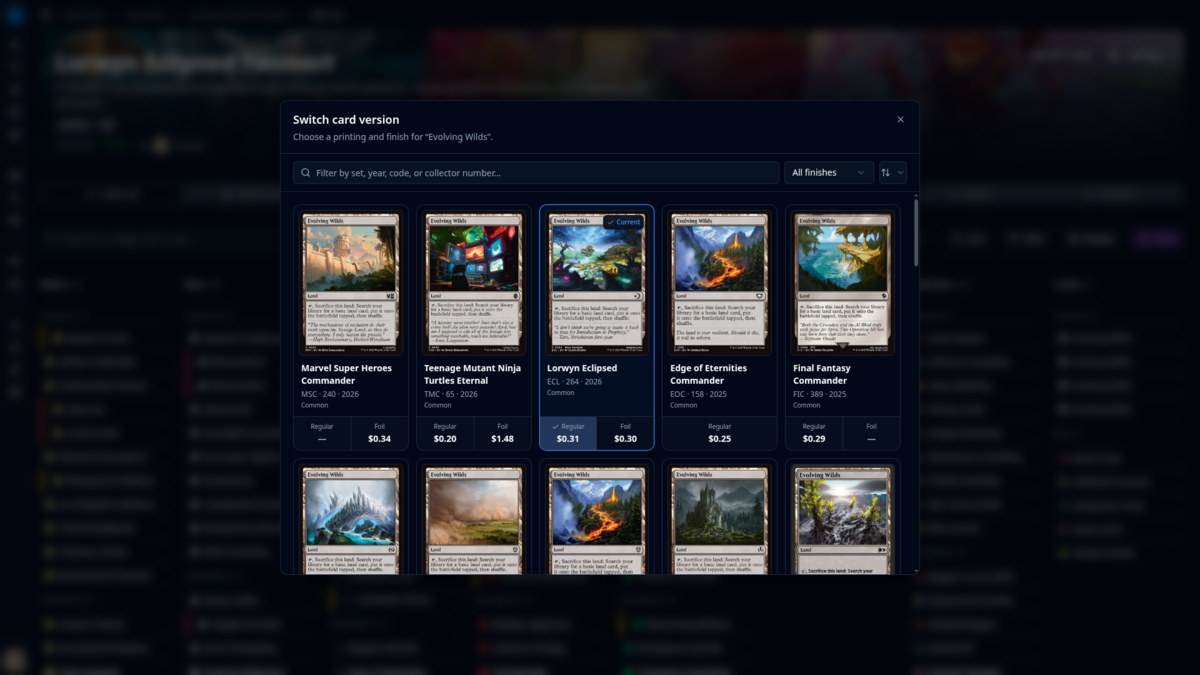
The card-version switcher has been rebuilt around both printings and finishes.
When you switch a card, you can now browse its available versions, filter by set, year, set code, or collector number, and sort the results in the way that is most useful to you. Each version shows the finishes it is available in, so you can choose regular, foil, or etched directly from the same place.
This is especially helpful for cards with a long printing history. Results load in sensible pages as you browse, rather than asking the editor to load every version up front.
✨ Your cube now remembers premium cards
CubeForge now stores a card's finish alongside its printing.
Foil and etched cards receive their own subtle treatment across the cube editor and card views, making a premium card feel distinct while keeping the list easy to scan. Prices also follow the finish you selected, so a foil or etched card can be valued separately from its regular counterpart.
The same information carries through the places where a cube needs to be moved or compared. Imports can recognise finish markers, exports preserve them, and version history keeps track of the specific cards you chose.
🃏 Keep drafts focused on the cards
Draft pools retain the finish information from your cube, including in exported decklists, but draft cards themselves stay visually regular.
That keeps packs, picks, and deckbuilding calm and readable: a foil or etched card is still the same game card in a draft, without adding visual effects that could distract from the table.
🔄 A smoother way to make a precise swap
The updated switcher is designed for the small decisions that happen while maintaining a cube. You can search within one card's printings, see the available finishes and prices at a glance, and make the change without leaving the editor.
Whether you are finishing a fully foiled cube, replacing a single printing, or simply choosing the art you like most, the result should feel quick and deliberate.
Version 0.7.12 is about making your cube feel more like your physical collection. The cards you choose, and the finish you choose for them, now have a proper place in CubeForge.
As always, if you notice anything off, please create a bug report here: Report a bug. You can also ask me directly in the CubeForge Discord.