
July 31, 2026
Version 0.8.0 - Release Notes
CubeForge 0.8.0 introduces multilingual card search, letting you find, add, view, and draft the official localized printings in your cube.
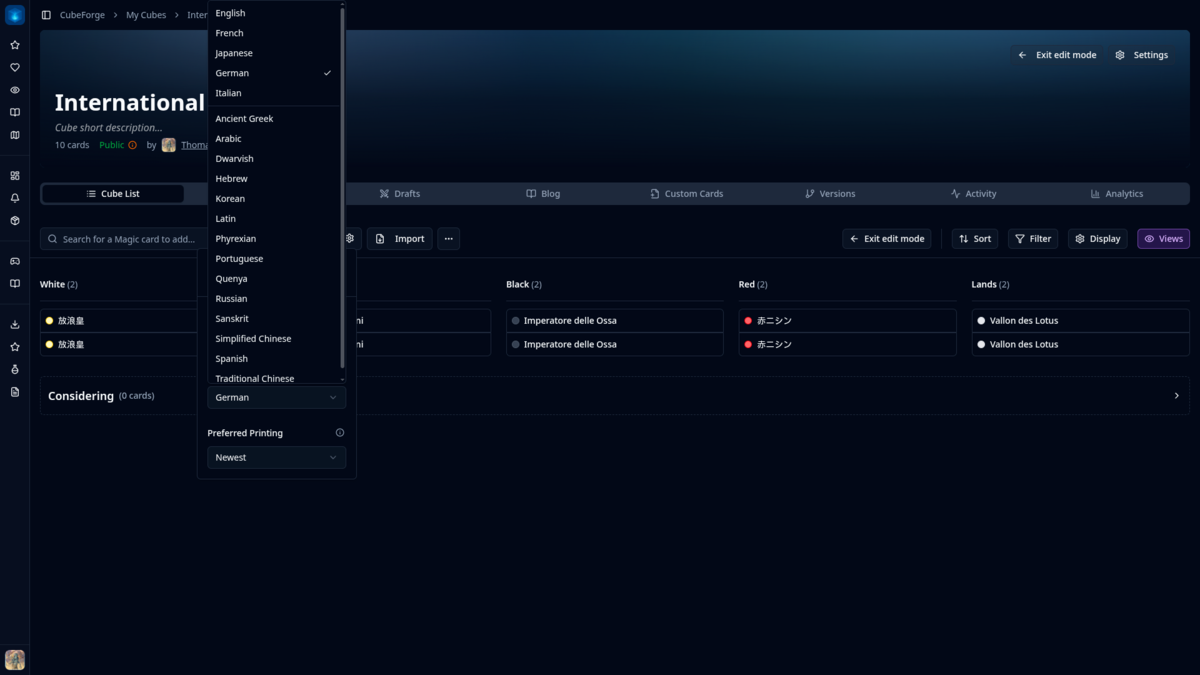
Version 0.8.0 is the first proper step towards multilingual card support in CubeForge.
Magic is a global game, but card tools still tend to treat English as the only language that matters. I want CubeForge to work better for players who collect, build, and draft in other languages too.
🌍 Search for cards in their printed language
Card search now has a Preferred Language setting.
Choose French and search for Foudre, or choose Japanese and search for 放浪皇. Results show the printed name alongside the English name, so it is still easy to recognise the card. English remains the default.
These are real, official localized printings. CubeForge is not generating translated card names or images.
🖼️ Keep the exact card you chose
When you add a localized card, CubeForge keeps its printed name, language, artwork, and exact printing.
The printed name appears in your cube list, and the printing switcher stays within the same language. Existing cubes are not changed or translated.
📖 Switch between printed and English text
For a non-English card, the detail window lets you switch between:
- the text printed on that card; and
- the English Oracle text.
You can keep the card you actually chose while checking the English rules text whenever needed.
This is especially handy for older localized cards with a missing or difficult-to-read scan. The original printing can stay in the cube, with readable English text available in the details.
🎴 Localized cards stay localized during drafts
The selected printing follows the card into drafts. It stays the same in packs, picks, your deck sidebar, card details, and the completed draft view.
The text switch is available there too. If your cube mixes languages and editions, the draft will show that same mix. This was important to me: the draft should use the cards the cube owner picked.
✨ A little more polish around the cube editor
I also cleaned up a few parts of the cube editor. Card previews are steadier, selection menus open more smoothly, and notifications are clearer. Card removal now appears immediately and is restored if saving fails.
🔭 What’s next
This is the first pass. Cube-wide translation and automatically matching cards to your interface language are not included yet, but I may explore them later.
For now, you can search in another language, choose the printing you want, and keep it from the cube list through the draft.
If you find a bug or a card that looks wrong, please report it here or let me know in the CubeForge Discord.