
February 10, 2026
Version 0.5.14 - Release Notes
Introduced a visual white paper editor and improved French and Japanese translations.
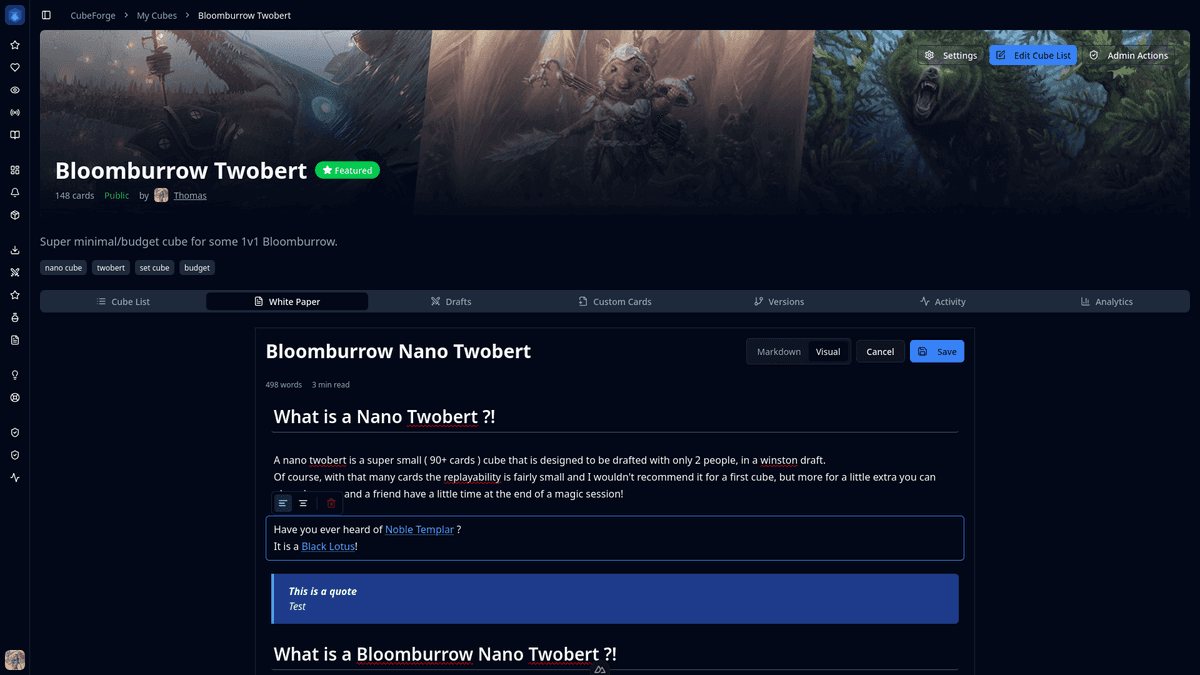
In today's update, version 0.5.14, I’m introducing a whole new way to write and edit white papers: the visual editor, along with improvements regarding the french and japanese translations.
🎨 What is the visual editor?
The visual editor is a much more natural way to edit a cube’s white paper, without writing Markdown directly, which can feel intimidating for many new users.
🧭 How to use it?
It is available for all cubes. Go to the White Paper tab and click Edit. You should now see the new UI, with a switch at the top that lets you move back and forth between the old Markdown editor and the new visual editor.
💡 Why did I build it?
I believe white papers are a very important part of a good cube, especially as a tool to introduce your cube to new players. So far, the editing experience has been painful, and I think that made many people, myself included, neglect the white papers for their cubes.